
Step 1: Remove the Water Tank and HEPA Bag
Remove the water tank and HEPA bag, then close the lid.
-png.png?width=396&height=528&name=image%20(5)-png.png)
Step 2: Locate the Side Brush Cavity
Turn Matic on its side and locate the side brush cavity.
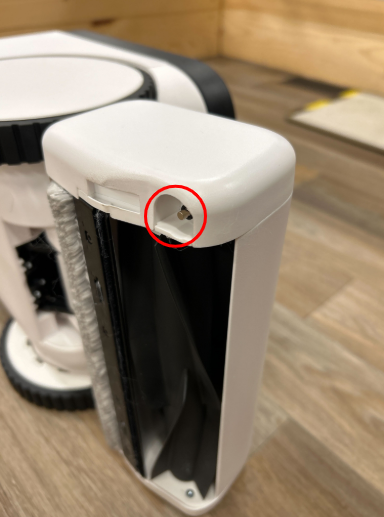
Step 3: Check for a Stray Magnet
Check for a stray magnet left behind from the previous side brush. If present, use a pair of pliers to remove it.
Step 4: Install the New Side Brush
Position the new brush in the cavity and let it snap into place.
Need more help?
If you have any questions or need further assistance, please submit a ticket in the Matic app (Settings > Support > Contact Us). Thank you for being a valued part of the Matic community!